
Freeter
Gather the web apps, files, commands, and notes each project needs into one desktop window, reachable from anywhere by a hotkey.
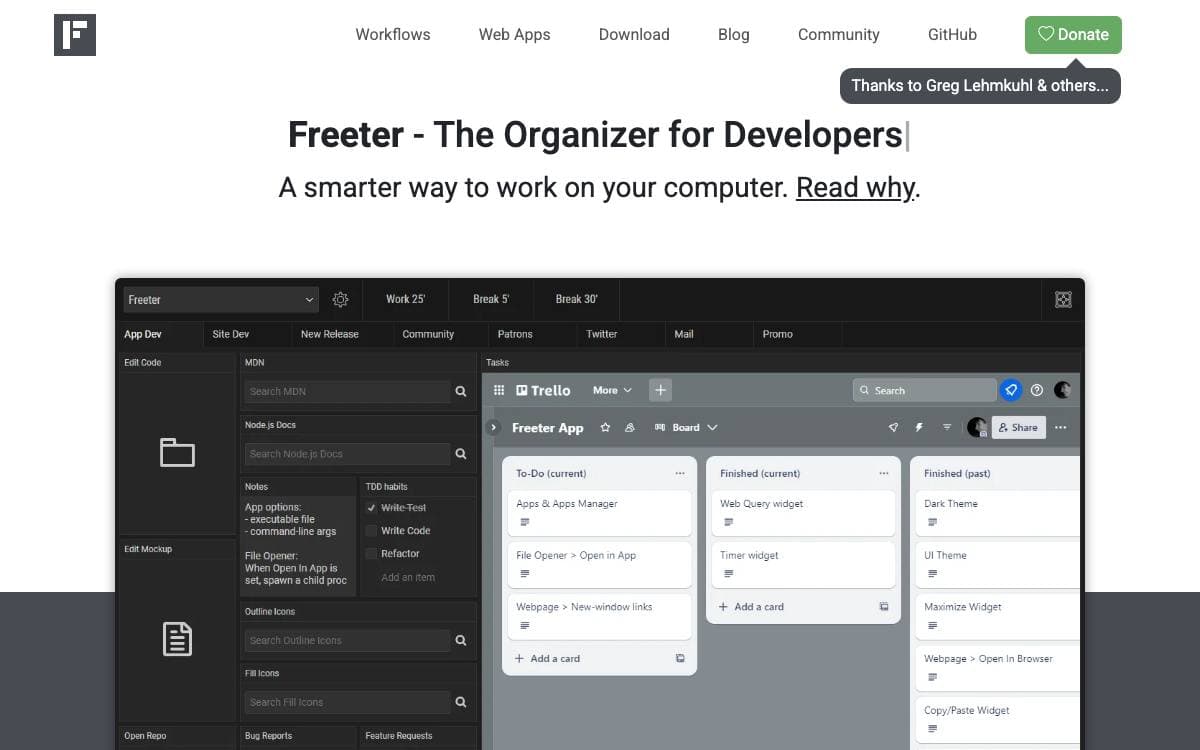
A dozen browser tabs, a terminal, a file manager, and a notes app charge a tax every time you change projects. Freeter is a desktop organizer that gathers everything one project needs onto a single screen, so switching context means picking a project from a menu, not rebuilding your setup.
A project holds workflows, and a workflow is a screen of widgets. Press Control or Command plus Shift plus F from anywhere, or use the tray icon, and the window appears with your current setup arranged. Workflows split across tabs when a project has sub-projects or too many widgets for one screen, and a shelf holds items you want present no matter which project is open.
Widgets are the building blocks, and the bundled set covers most of a working day.
- Webpage: embed the web apps you use daily, staying signed in to different accounts per project, workflow, or widget.
- File opener: open project files and folders in your editor with one click.
- Web query: run templated searches against a search engine or any other site.
- Commander: execute frequently repeated terminal commands from a button.
- To-do list and note: keep checklists and quick notes on the workflow screen.
- Timer: a countdown for breaking work into focused intervals.
Builds run on most Linux distributions, Windows 10 or later, and macOS 10.15 or later including Apple Silicon. Installers come from the download page, or build from source with Node.js in three commands. The app collects no telemetry and is released under the GNU General Public License.









Stars
1,027Forks
66Last commit
5 months agoRepository age
3 yearsLicense
GPL-3.0Version
2.8.0-betaRepository
FreeterApp/Freeter
Auto-fetched from GitHub .
Open source alternatives similar to Freeter:
Stars
Forks
Last commit
Stars
Forks
Last commit
Stars
Forks
Last commit